Albania
 Argentina
 Australia
 Austria
 Belgium
 Bosnia and Herzegovina
 Brazil
 Bulgaria
 Canada
 Chile
Chile
 Colombia
 Croatia
 Czech Republic
 Denmark
 Estonia
 Finland
 France
 Germany
 Greece
 Hungary
 Ireland
 Italy
Italy
 Latvia
 Lithuania
 Luxembourg
 Mexico
 Moldova
 Montenegro
 Netherlands
 New Zealand
 North Macedonia
 Norway
 Philippines
 Poland
 Portugal
 Romania
 Serbia
 Slovakia
 Slovenia
 South Africa
 Spain
Spain
 Sweden
 Switzerland
 Turkey
 Ukraine
 United Kingdom
 United States of America



Hi-Fi Optical cables
Hi-Fi optical cables carry a digital audio signal between the optical output of a source and the optical input of a receiver. When choosing one, check the connector type at both ends, the required length, and how the cable will be routed. Protecting the connectors from dust and damage is also important. Rather than focusing on sound-related promises, concentrate on interface compatibility and the practical conditions of the connection.
Hi-Fi optical cables
An optical audio connection uses light transmission, so it does not create an electrically conductive connection between devices. The cable carries a digital signal from a device marked as having an optical output to a device with an optical input. A passive cable itself generally does not determine the transmission direction, but the connection direction is defined by the roles of the ports: the output transmits and the input receives. If a particular cable or its connectors indicate a direction, follow the manufacturer's marking.
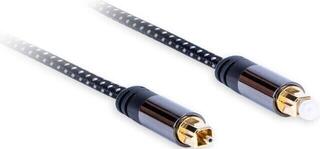
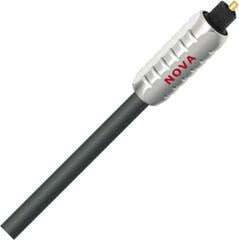
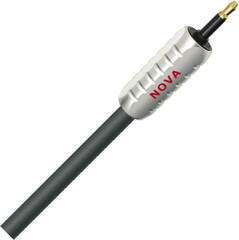
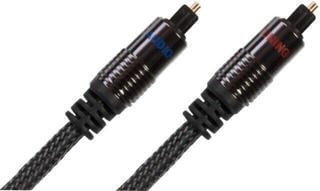
The connector you will encounter most often is the square TOSLINK connector, although some devices use the smaller mini-TOSLINK optical connector. Do not identify a socket solely by its approximate size; check its label in the manual or next to the port. An optical connector cannot be replaced with a standard analogue audio connector just because it has a similar shape.
Connectors at both ends
The first connector type must match the source's optical output, while the second must match the target device's optical input. You need identical connectors when both devices have standard TOSLINK sockets. Different connectors only make sense when combining two different types of optical port.
| Connection | What to check | When to choose it |
|---|---|---|
| TOSLINK – TOSLINK | A standard optical socket on both devices | When both the source and receiver use the same square optical port |
| TOSLINK – mini-TOSLINK | Which device has the smaller optical port | When the devices have different types of optical socket |
| mini-TOSLINK – mini-TOSLINK | A smaller optical port on both sides | Only when both devices being connected have one |
What to check before choosing
- Find the optical output on the source device and the optical input on the receiver.
- Check the exact connector type at each end; do not rely solely on the device name.
- Measure the actual route between the ports, including routing behind furniture, and allow reasonable slack without putting the cable under tension.
- Check that the connector fits in the space around the port and that adjacent cables will not obstruct it.
- Choose a route without sharp bends, pinching by doors, or prolonged pressure from furniture.
- Remove the protective caps from the connectors before plugging them in and keep them for later use.
- Make sure the connectors and ports are clean; avoid touching the optical surfaces unnecessarily.
- Check the digital audio output in the source settings and select the correct input on the receiver.
Practical length and routing
Choose the length based on the actual route, not just the direct distance between the devices. A cable that is too short may strain the connectors, while an unnecessarily long cable creates loops that are harder to arrange. Route the optical fibre in gentle curves and do not bend it at a sharp angle. Before moving a device, disconnect the cable by gripping the connector body rather than pulling on its jacket.
If you are assembling a system with multiple components, plan the port positions before arranging the cabling. You can find an overview of sources, receivers, and other system components in the Hi-Fi systems category. Only use an optical connection between the corresponding digital optical output and input.
Protecting the connectors and checking the connection
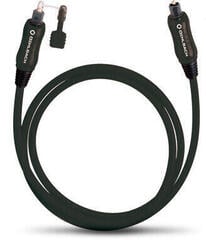
Leave the protective caps on the connectors until you are ready to plug them in. Put them back on when the cable is disconnected to prevent dust from settling on the optical surfaces and to protect the connectors from damage during storage. Store the cable loosely, without coiling it tightly or placing objects on its connectors.
- Turn off or mute the connected devices.
- Remove the caps and check that both connectors are clean.
- Connect the correct end to the optical output and the other end to the optical input without using excessive force.
- Select the appropriate digital input on the receiver and set a supported output format on the source.
- If there is no sound, check the selected input, the source settings, and whether the connectors are fully inserted again.